ConfigDlgComponent
| Declaration: |
ConfigDlgComponent(CompIx: integer; Params: string): integer; |
|
This function allows you to configure individual components of the input dialog. The parameter CompIx specifies the component to be addressed. The properties to be changed have to be defined in the parameter Params, which is a string containing the definitions using a very simple syntax:
prop1=val1; prop2=val2; ....
The individual assignments have to be separated by semicolons, the values in an assignment have to be assigned by an equal sign (=).
The properties vary from component to component and are ignored if a property is not valid for the particular component. The following properties are defined and can be adjusted by means of the ConfigDlgComponent function:
| Property |
Valid for |
Explanation |
| allowedit |
gcColorSel |
controls whether the colors of the color dropdown box can be edited or not. If allowedit is set to TRUE any color can be edited by clicking the small triangle in the color field of the box. This opens a color dialog where you can select a suitable color. |
| box |
gcNumIO |
allows to display an additional "freeze box" which can be used to indicate a default value while blocking any user input. The parameters for the property box are "off", "checked" and "unchecked" |
| boxleft |
gcNumIO |
the distance between the right side of the numeric input field and the "freeze box" |
| boxsize |
gcNumIO |
the size of the "freeze box", common values are between 10 and 20 |
| cname |
gcNTabEd |
the column header of a specific column. The index of the column header must be specified in square brackets, for example: cname[2]=Intensity; sets the header of column 2 to the string "Intensity". |
| hgt |
gcRadioBox, gcNTabEd |
the height of the gcRadioBox component. Please note that height indirectly controls the spacing between the displayed options. |
| hidefrin |
gcNumIO |
if you activate the freeze box (parameter "box", see above) you can decide whether the numeric value is displayed in gray ("hidefrin=false") or the numeric value is hidden ("hidefrin=true"). |
| high |
gcNumIO |
the upper boundary of the allowed range of input values in the gcNumIO component |
| inc |
gcNumIO |
the increment of the button in the gcNumIO component |
| left |
gcNumIO, gcEdit, gcCheckBox, gcLabel, gcRadioBox, gcDropDown, gcColorSel, gcNTabEd |
the position of the component in x direction (in pixels). By default, the left property is set to the AlignAt parameter of the CreateDialog function |
| low |
gcNumIO |
the lower boundary of the allowed range of input values in the gcNumIO component |
| ncol |
gcNTabEd |
the number of columns of the table editor |
| nrow |
gcNTabEd |
the number of rows of the table editor. |
| opt |
gcRadioBox, gcDropDown |
the available options to select from. The options have to be separated by pipe (|) symbols. If you want a pipe symbol to appear in the option text, it has to be preceded by the escape character '\' (backslash). By default, the options are set to "Option 1|Option 2" |
| pal |
gcColorSel |
the default color palette to be loaded. The parameter pal may take values between 0 and 3:
0 ... basic VGA palette (the 16 colors of the VGA graphics adapter)
1 ... extended palette (the VGA palette plus 4 additional colors)
2 ... Windows system palette (the system colors of Windows)
3 ... standard palette (a combination of palette 1 and 2)
|
| prec |
gcNumIO, gcNTabEd |
the precision of the display of the numeric value in the gcNumIO component. A positive value switches to fixed point notation using prec decimal places, a zero value switches to integer values, and a negative value switches to exponential notation with prec significant digits. Please note that prec does not affect the precision of the stored value, it only affects the displayed value. Values are stored internally always with double precision. |
| ratt |
gcNTabEd |
determines whether the row attributes are displayed ("ratt=true") or not ("ratt=false"). By default the row attributes are visible. |
| retcol |
gcNTabEd |
the index of the returned column: while the table editor is capable to display and edit several columns, only one column of the table can be returned to the calling program. The parameter retcol specifies this index. For example, if retcol is set to 2, the returned variant array element of ShowDialohg is an array containing all values of column 2. |
| rname |
gcNTabEd |
the row header of a specific row. The index of the row header must be specified in square brackets, for example: rname[11]=John; sets the header of row 11 to the string "John". |
| rtxt |
gcNumIO |
the text displayed right of the input field (no apostrophes, just the text(1)) |
| top |
gcNumIO, gcEdit, gcCheckBox, gcLabel, gcRadioBox, gcDropDown, gcColorSel, gcNTabEd |
the position of the component in y direction (in pixels). By default, the top property is set to the TopPos parameter of the CreateDialog function |
| val |
gcNumIO, gcEdit, gcCheckBox, gcLabel, gcRadioBox, gcDropDown |
the value to be assigned to the property; the type of the value depends on the component: gcNumIO expects a numeric value, gcEdit a text value (no apostrophes, just the text(1)), gcCheckbox expects a boolean value (TRUE or FALSE), and gcRadioBox and gcDropDown expect an integer value which controls the preselection of the options (a zero value deselects all options). |
| wid |
gcNumIO, gcEdit, gcRadioBox, gcDropDown, gcColorSel, gcNTabEd |
the width of the component (in pixels) |
The function returns the following error codes:
0 ... everything is OK
-1 ... the dialog does not exist (CreateDialog was not called)
-2 ... the component does not exist
-3 ... invalid parameter
|
Sample
program: |
The following script fixes the deficiencies mentioned in the section ShowDialog by adjusting the initial values, the precision and the range of the numeric input elements:
program AskBodyData_V2;

var
  DlgResults     : TVariantArray;
  aux            : TVariantArray;

begin
CreateDialog (150,10,'Sample Dialog',
              [gcLabel, gcEdit, gcCheckbox, gcNumio, gcNumio, gcRadioBox, gcColorSel],
              ['', 'Name', 'Left handed', 'Body height [cm]', 'Shoe Size',
               'Eye color|Please select closest color', 'Your favorite color']);
ConfigDlgComponent(1,'left=10;val=Please enter your body data:');
ConfigDlgComponent(4,'prec=1;val=170;low=40;high=230;box=unchecked;rtxt=auto;hidefrin=true');
ConfigDlgComponent(5,'prec=1;inc=0.5;val=40;low=16;high=60');
ConfigDlgComponent(6,'hgt=125;opt=brown|blue|gray|green|other;val=2');
DlgResults := ShowDialog;
if DlgResults[0] = 0 then
  begin
  cout ('Name: ',DlgResults[2]);
  cout ('Left handed: ',boolToStr(DlgResults[3],0));
  aux := DlgResults[4];
  cout ('Body height: ', aux[0]);
  cout ('Body height freeze box checked: ', aux[1]);
  aux := DlgResults[5]
  cout ('Shoe size: ',aux[0]);
  cout ('Eye color: ',IntToStr(DlgResults[6]));
  cout ('Favorite Color: ', Hex(DlgResults[7],8));
  end;
end.
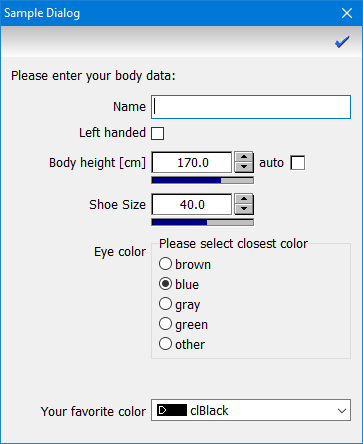
|
|

 Programming DataLab

